
1. Log in to your cPanel account.
2. In the Advanced section, click on Cron Jobs.

3. Under Add New Cron Job, click on the Common Settings drop-down menu and select an appropriate option such as Once Per Day or another suitable option.
4. Enter your cronjob PHP file location or the command you want to run in the Command field.
5. Click on Add New Cron Job. 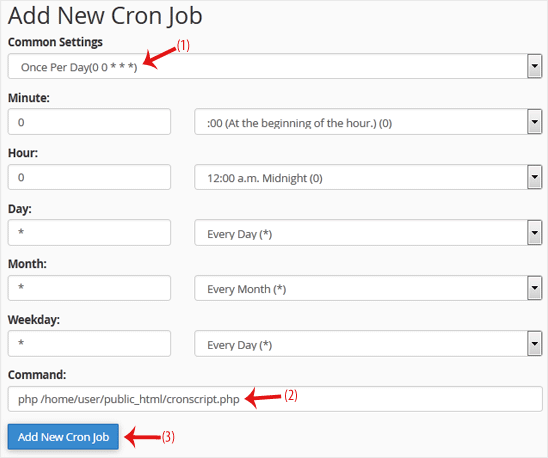
İlgili diğer dökümanlar
cPanel Hesap Şifresi Nasıl Sıfırlanır
cPanel hesabınıza erişiminiz varsa, şifrenizi sıfırlamak için aşağıdaki...
cPanel'in Stil/Teması Nasıl Değiştirilir
Farklı bir stile sahip başka bir cPanel temasına geçiş yapmak kolaydır.1....
"cPanel Dosya Yöneticisi ile Dosyalar Nasıl Yüklenir
FTP programı kullanmak yerine cPanel’in dahili dosya yöneticisini...
How to Edit (Dot)htaccess File in the cPanel File Manager
1. Log in to your cPanel account. 2. In the Files section, click on File...
How to Check the Disk Usage and the Bandwidth Usage of Directories
If you are getting a disk space usage warning from cPanel and don't know...