
You can forward an email to other email accounts using Mozilla Thunderbird.
1. Open Mozilla Thunderbird.

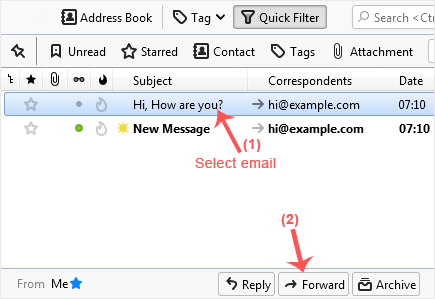
2. Go to Inbox. Select the message you want to forward, and it will show the Forward option. Click it.
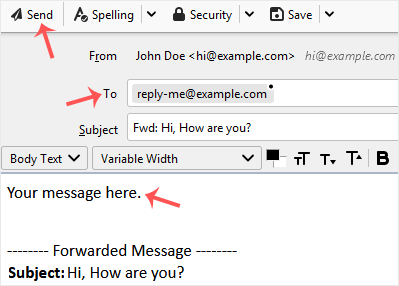
3. Type your message in the message box. Do not modify the email title and the rest of the text. Then click on send.
İlgili diğer dökümanlar
How to Setup a cPanel Email Account in Mozilla Thunderbird
Thunderbird is a friendly email client software for managing your email. You...
How to Check for New Email in Mozilla Thunderbird
Thunderbird is an email client software. You can work with it in the...
How to Send an Email Using Mozilla Thunderbird
You can send an email using Thunderbird. It is quite straightforward as you...
How to Delete Email Messages in Mozilla Thunderbird
You can easily remove email in Mozilla Thunderbird. If you use the POP...
How to Reply to Email in Mozilla Thunderbird
You can reply to an email using Mozilla Thunderbird instead of the cPanel...