
You can edit the hosting package of your account. With root access, you can edit the packages of any user.
1. Log in to your WHM Account.
2. Go to Packages >> Edit a Package or type Edit a Package in the menu filter box. The option will appear. Click on it.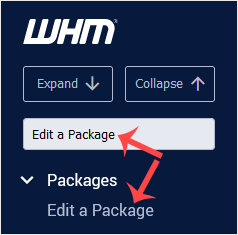
3. Select the package you want to edit.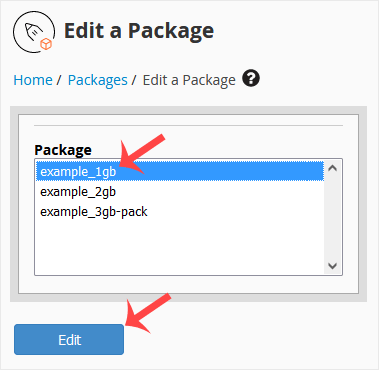
4. Under Edit a Package, you can modify resources like disk space, bandwidth, etc.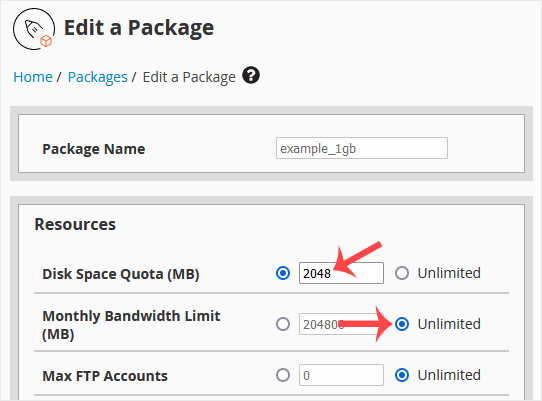
5. Scroll down, and click on Save Changes.
İlgili diğer dökümanlar
How to Suspend a cPanel User in the WHM Account
You can suspend а cPanel user from accessing your WHM account. 1. Log in to...
How to Limit Bandwidth Usage of cPanel User From WHM
Do you want to increase or limit cPanel user's bandwidth usage? A WHM user...
How to Force cPanel Users to Change Their Passwords Using WHM
Do you want to force cPanel users to change their passwords after login? If...
How to Enable/Disable Features of cPanel Account From WHM
You can enable/disable features of your customers' cPanel account from WHM....
How to Create a Feature List in WHM
You can create a feature list from your WHM Account. Feature lists allow you...